
Scoped logging injects metadata tags into batch processing log output. This format enables automated log parser scripts to isolate specific processing stages, trace errors to distinct source assets and aggregate performance metrics.
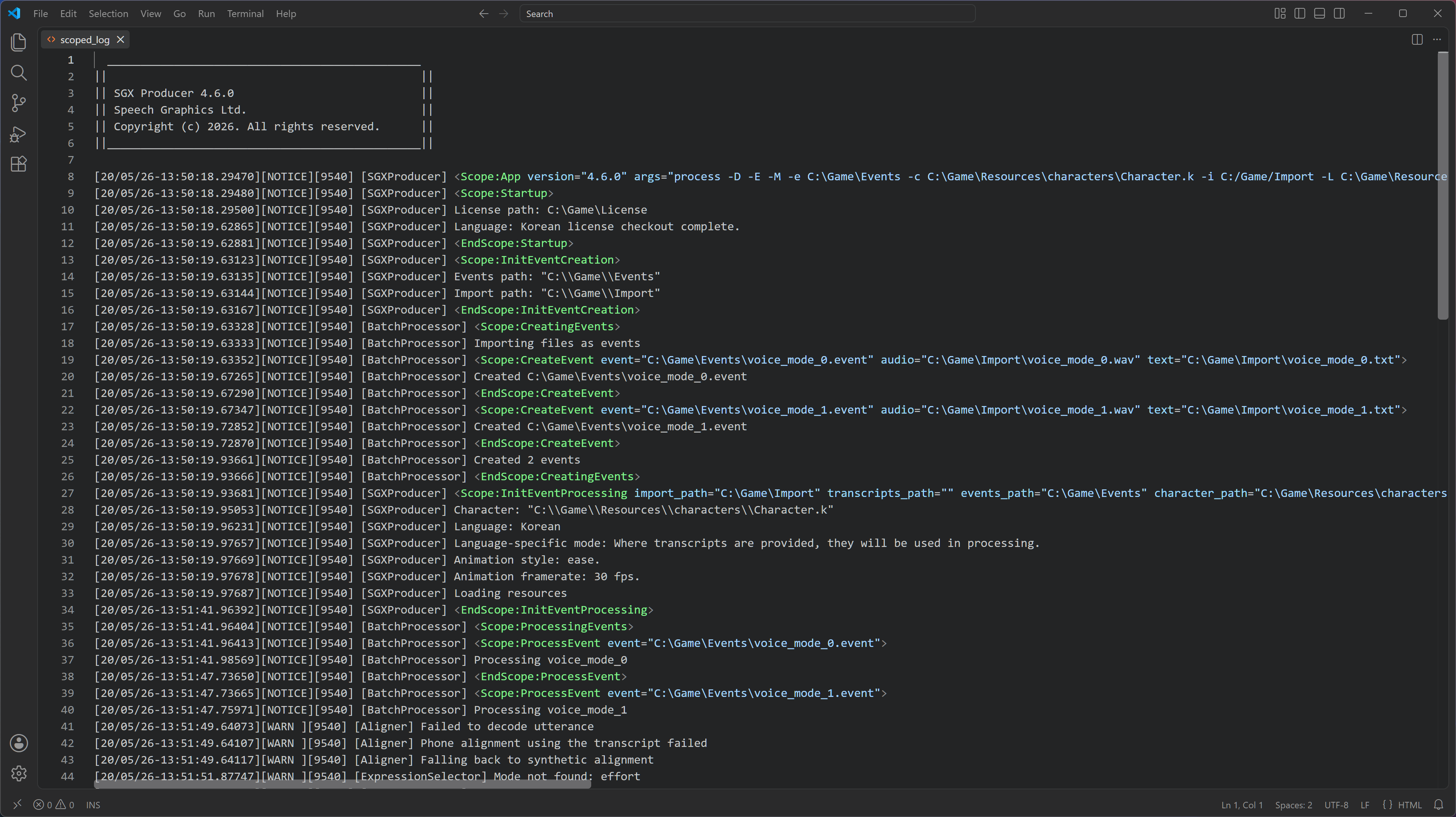
Activation
To enable scoped logging in the output, append -D to your command-line execution string:
SGX_Producer.exe process -D -e "<path to events>" -c "<path to character file>"
Alternatively, enable the scoped log checkbox in SGX Director before running batch processing.
Scope tags
Scopes are bounded by opening and closing marker tags inside the standard log message field. Opening tags may contain metadata.
-
Opening Tag:
<Scope:ScopeName [metadata]> -
Closing Tag:
<EndScope:ScopeName>
Scope definitions
Below are the scopes that will occur in the log.
|
Scope Name |
Execution Context |
Nested Scopes |
|
|
Root scope. It will hold messages that fall outside the other scopes. |
|
|
|
Initialisation, license verification, language file loading. |
None |
|
|
Initialisation before |
None |
|
|
High-level execution wrap for the audio and transcript import stage. |
|
|
|
Individual import operations. Links source audio and transcript/text to a destination event file. |
None |
|
|
Initialisation before |
None |
|
|
High-level execution wrap for the processing stage. |
|
|
|
Individual process operations. Has reference to the event file being processed. |
None |
|
|
Initialisation before |
None |
|
|
High-level execution wrap for the reprocessing stage. |
|
|
|
Individual process operations. Has reference to the event file being processed. |
None |
|
|
High-level execution wrap for the exporting animations stage. |
|
|
|
Individual process operations. Has reference to the event file being processed. |
None |
|
|
High-level execution wrap for the exporting metadata stage. |
|
|
|
Individual process operations. Has reference to the event file being processed. |
None |
|
|
Resource deallocation, software license check-ins, thread termination, clean up. |
None |
Metadata
Scope tags can contain the following metadata.
-
The
App,InitEventProcessing,InitEventReprocessing,CreateEvent,ProcessEventandReprocessEventscopes can have key-value pairs (key=value key=value) inside the opening tag. -
The root
Appscope metadata containsversionandargsattributes.-
version: Application version. -
args: Execution arguments.
-
-
The
CreateEventandProcessEventscopes could contain the following metadata:-
event: Path to the generated or processed target.eventfile. -
audio: Path to the source audio asset (.wav,.txt,.csv). -
text: Path to the associated transcript source asset.
-
-
The
InitEventProcessingandInitEventReprocessingscopes contain the following metadata:-
import_path: Path to the directory containing audio assets for import. -
transcripts_path: Path to the directory containing transcription files. -
events_path: Path to the target directory for event files. -
character_path: Path to the specific character definition file (.k). -
languages_path: Path to the localized language assets folder. -
language: Language identifier (usually the filename of the language .k). -
behavior: Behaviour settings. -
animation_style: Animation Style. (e.g., ease). -
function: First argument passed when running the .exe (e.g., process). -
pre_roll: Pre-roll added to each animation. -
post_roll: Post-roll added to each animation. -
active_start: Timestamp marking the beginning of active tracking. -
neutral_finish: Timestamp marking the return to a neutral state. -
overwrite: 0 or 1. Allow replacing existing event files. -
full_reprocessing: Integer code. -
export_animation: Binary flag indicating if animation data should be output. -
export_metadata: Binary flag indicating if metadata files should be output. -
fixed_pre_roll_ms: Pre-roll duration defined in milliseconds. -
fixed_post_roll_ms: Post-roll duration defined in milliseconds. -
framerate: Target framerate.
-
Examples
The following are some examples of scope tags with metadata:
<Scope:App version="4.5.2" args="process -e C:\Dev\Korean_event -c C:\characters\Tony_4j.k -i C:/Audio transcript -L C:\languages\Korean -l Korean">

<Scope:CreateEvent event="C:\Korean_event\voice_mode_6.event" audio="" text="C:\Audio transcript\voice_mode_6.txt">

<Scope:ProcessEvent event="C:\Korean_event\HaraSeo_1a.event">